

User access reviews (UARs) are the process of verifying that users only have the access they need for their role, helping organizations meet compliance requirements like SOX, HIPAA, and GDPR.
In practice, UARs are one of the most time-consuming and frustrating parts of identity governance. Manual reviews, spreadsheet-based tracking, and periodic certifications create reviewer fatigue, delay remediation, and leave teams approving access based on stale or incomplete data. As identity sprawl accelerates across cloud apps, service accounts, and AI-driven workflows, many organizations turn to UAR software to automate reviews, reduce operational burden, and produce audit-ready evidence with confidence.
Here’s everything you need to know about purchasing the right UAR tool.
The 9 Best User Access Review Tools in 2026
- ConductorOne
- SailPoint IdentityIQ
- Microsoft Entra
- CyberArk Identity
- Ping Identity
- ManageEngine ADAudit Plus
- Lumos
- LogicManager
- SecurEnds
1. ConductorOne: Intelligent Access Reviews
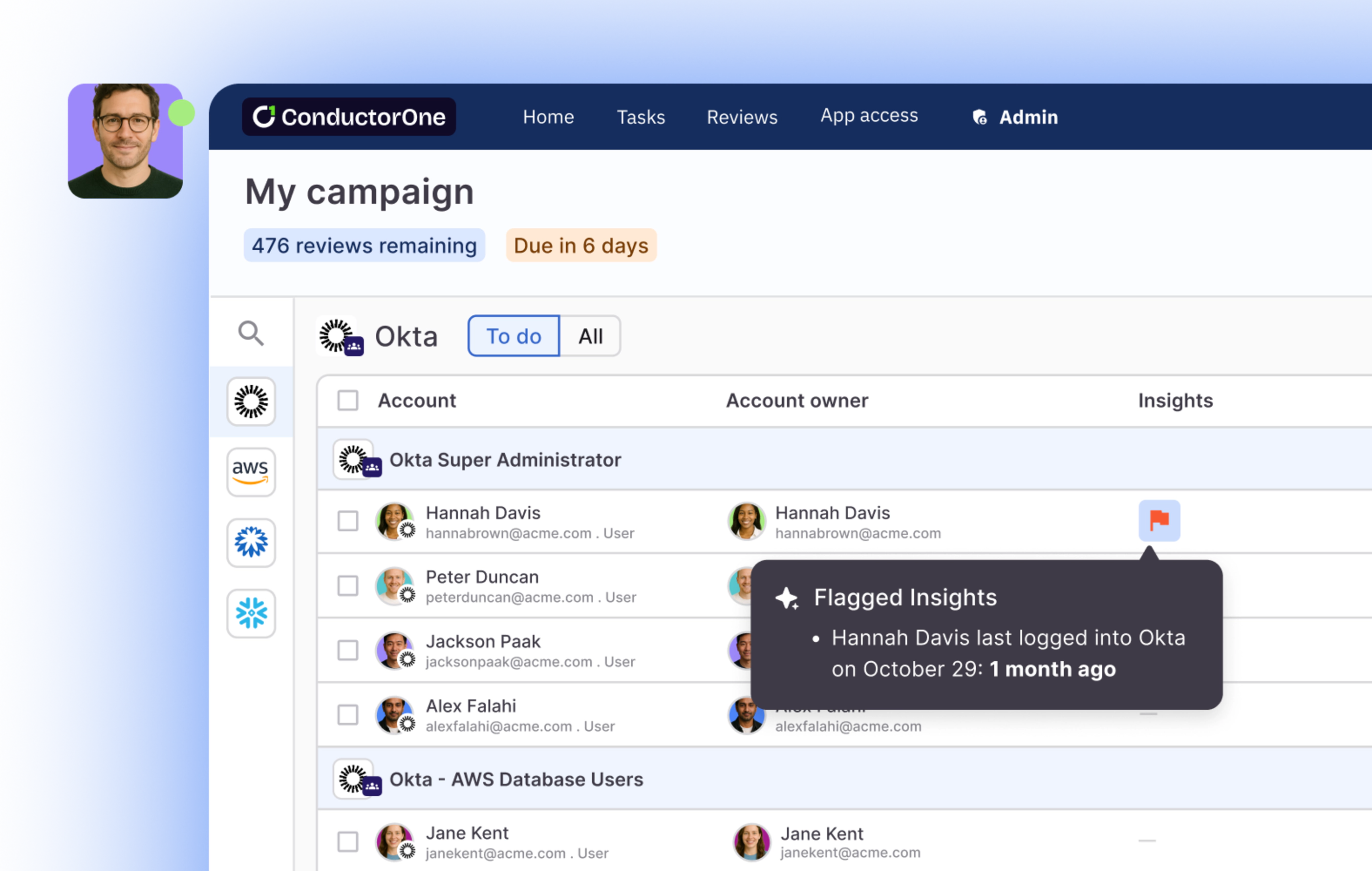
ConductorOne is the AI-native identity security platform designed to manage and secure user access across an organization’s entire stack. It centralizes the control of identity and access management, offering automated solutions to streamline security protocols and ensure compliance in modern IT environments.
The platform supports agentless connectors that integrate seamlessly with various systems, enhancing visibility and control without requiring extensive manual setup. The extensible platform supports the use of modern tools like Terraform and webhooks, allowing IT and security teams to configure as code and create custom workflows, thus providing a scalable and efficient solution for handling access rights across complex environments.
Key Features of ConductorOne’s User Access Reviews
Access Fabric: ConductorOne’s access fabric is the foundational data layer underpinning the platform’s powerful access control and governance capabilities. It enables visibility and control over user access across an organization’s applications and infrastructure by creating a central source of truth for identity and access management.
💡Access fabric includes an easy-to-use visualization tool that allows teams to view access paths for any user, application, or resource, which can significantly aid in understanding and managing permissions more effectively. It also provides built-in remediation options that facilitate prompt action to secure at-risk accounts or adjust inappropriate access rights.
Intelligent, Automated Access Reviews: ConductorOne automates user access reviews end to end, replacing spreadsheets and manual tracking with continuous, risk-aware reviews across your entire environment. Platform-native AI agents handle routine certifications, surface risk-based recommendations, and give reviewers the context they need to make confident decisions faster.
Self-Service Access Requests: ConductorOne provides self-service access requests through an intuitive app catalog available in Slack, CLI, or the web, making it easy for users to request access to apps, roles, and permissions. Requests are automatically routed with full context, approved quickly, and provisioned instantly through direct integrations, IdPs, or SCIM, eliminating manual back-and-forth.
Just-in-Time Access: JIT access facilitates immediate and temporary access provisioning to resources, which is then automatically revoked after a predetermined period or upon completion of a task. This helps in maintaining tight security controls and reducing standing privileges.
Shadow IT Detection: ConductorOne can detect and manage unauthorized app usage, helping secure environments against potential breaches initiated through unmonitored applications. The platform provides real-time insights into shadow app usage by monitoring who uses these applications and when they are used.
💡Did you know? ConductorOne helps you eliminate unnecessary SaaS spend. Lower your overall SaaS costs by bringing shadow apps under management. Eliminate unnecessary apps, control access, and monitor ongoing usage.
Watch → How Ramp enforces least privilege | ConductorOne Customer Spotlight
2. SailPoint IdentityIQ
SailPoint IdentityIQ is an advanced identity governance solution tailored for complex enterprise environments to automate and secure user access and identity management across various systems. It does this by leveraging AI and machine learning for predictive identity functionalities, allowing organizations to detect and respond to strange access patterns.
The solution offers a robust set of capabilities, including user access discovery, role-based access control (RBAC), segregation of duties (SoD) enforcement, access request and approval workflows, and more. These features automate the processes involved when employees join, move within, or leave an organization — ensuring continuous compliance and security.
In addition, IdentityIQ integrates with various IT environments through SailPoint’s extensive connector library, supporting both on-premises and cloud applications.
Features of SailPoint IdentityIQ
SailPoint IdentityIQ offers two distinct features:
- Lifecycle Management. This feature simplifies user access requests through a self-service portal, allowing users to request access as needed. This process is supported by automated provisioning (creation and setup) and deprovisioning (revocation and removal) of access rights and accounts across all connected systems.
- Compliance Management. This simplifies compliance processes by automating access certifications and allowing managers and auditors to periodically review and verify user access rights. It also provides tools for managers to approve, revoke, or modify user access. They can choose to schedule this process regularly (e.g., quarterly, annually) and can also customize it to suit the specific data compliance requirements of the organization.
Other features include:
- SailPoint extension modules and add-ons:
- SailPoint Password Manager. Enables users to manage and reset their passwords.
- SailPoint File Access Manager for Data Access Governance. Provides secure access to regulated and unstructured data.
- SailPoint Access Risk Management. Unifies access control across multiple applications such as SAP ERP, SAP SuccessFactors, S/4HANA and more.
- SailPoint SaaS Management. Visibility into hidden and over-provisioned accounts in SaaS environments.
3. Microsoft Entra
Microsoft Entra is a comprehensive identity and access management suite designed to secure, manage, and govern access across various environments, from cloud-based systems to hybrid settings.
Entra integrates several components, including the rebranded Azure Active Directory (now Microsoft Entra ID), which handles billions of authentications daily. This integration helps manage user and workload identities, apps, and devices, securing them through multi-factor authentication (MFA), single sign-on (SSO), and conditional access policies.
One of Microsoft Entra’s standout features is its support for decentralized identity through Microsoft Entra Verified ID. This platform uses blockchain technology to enable user-owned digital identities that can be verified without central authority, providing greater privacy and control over personal data. It also supports verifiable credentials that users can manage and present through Microsoft Authenticator, integrating seamlessly with applications across various platforms.
Workload ID helps secure applications and their connections to cloud resources, ensuring that only authorized services can access sensitive data.
Features of Microsoft Entra
- Permissions Management. As part of its cloud infrastructure entitlement management (CIEM) capabilities, Entra offers detailed visibility and control over permissions across Microsoft Azure, Amazon Web Services (AWS), and Google Cloud Platform (GCP).
- Workload ID. Entra provides identities for applications and services, allowing secure access to cloud resources and facilitating secure interactions between different tech stacks.
- Domain Services. This gives you access to managed domain services—such as Windows Domain Join, group policy, LDAP, and Kerberos authentication—without having to deploy, manage, or patch domain controllers. You also enjoy a ‘lift-and-shift’ migration of legacy applications from your on-premises environment to a managed domain.
- Identity Governance. Provides tools for managing the entire lifecycle of employee identities, from creation based on HR system signals to removal when an employee leaves the organization. It also enables secure access for guest and partner identities.
4. CyberArk Identity
CyberArk Identity is an identity and access management (IAM) solution that provides comprehensive security features to manage and secure identities across an enterprise. This solution integrates various functionalities to safeguard human and machine identities, ensuring secure access to resources irrespective of location.
The platform offers privileged access management (PAM), allowing organizations to control, monitor, and secure access to critical systems and data. Key features include the management of privileged credentials, session security, and threat detection, which are vital to preventing unauthorized access and mitigating insider threats.
CyberArk Identity also offers advanced features like just-in-time access, reducing the risk associated with permanent privileged access by granting privileges on an as-needed basis.
Additionally, for endpoint security, CyberArk provides tools that help organizations enforce least privilege policies and secure credentials on endpoints, which are critical for protecting against ransomware and other malware attacks
Features of CyberArk Identity
- Identity Connector. Helps integrate with on-premise directories and internal web applications, allowing RADIUS authentication without a VPN. Plus, it enhances security by issuing unique PKI Certificates to each tenant, encrypting communications, and ensuring all data transfers with the CyberArk Cloud are over TLS 1.2, making them unreadable by AWS infrastructure.
- User and Admin Portal Security. CyberArk Identity allows user authentication through its directory, external directories like Active Directory, or external Identity Providers. It implements password rules via built-in or external policies or SAML integration. The Admin Portal is protected with security features such as CAPTCHA, security images, adaptive MFA, and defenses against login attacks. Additionally, CyberArk supports third-party MFA solutions and controls administrative access through specific roles and permissions.
- CyberArk Cloud Agent Security. connect to the Internet using corporate settings and securely communicate with the CyberArk Identity tenant. All communications, including data transmission and “keep alive” checks, are encrypted using SSL/TLS. The HTTPS connection utilizes TLS 1.2 or higher Cipher Suites, ensuring that all data exchanged with the CyberArk cloud is encrypted in transit.
5. Ping Identity
Ping Identity is an all-in-one identity and access management (IAM) platform for complex enterprise environments. It has multiple authentication methods, including the PingID mobile application for Apple and Android devices, which is fully managed by Ping Identity, the PingID desktop app and PingID APIs.
Ping Identity can also handle different identity scenarios across large-scale deployments, supporting thousands of SaaS and on-premises applications, which helps streamline authentication processes and reduce administrative overhead.
Features of Ping Identity
- PingOne Credentials. Enables organizations to create, issue, manage, and revoke digital verifiable credentials (VCs) from a unified interface. These credentials, which include identification records, entitlements, and authorizations, allow service providers to instantly verify their authenticity and integrity at the time of use. The system also allows for customizing and automatic issuance of credentials based on predefined attributes, ensuring that each credential contains essential information such as the issuer, recipient, and specific data attributes. In addition, these credentials are cryptographically secure, guaranteeing their provenance and safeguarding against tampering.
- Ping Identity Verification. This offers solutions such as; quick matching of a live-face capture with a government ID, easy integration of identity verification into applications and workflows, automating the form-filling process with verified attributes, and enabling seamless linking of digital identities to devices or credentials.
- Selfie Matching. users are prompted to submit a selfie, which is then passively checked for liveness using ISO-certified technology to ensure authenticity.
- PingOne Protect. This feature utilizes a comprehensive set of risk predictors to calculate an overall risk score, which then informs the enforcement of various security measures based on user behavior and potential threats. These measures can include CAPTCHA, password resets, selfie verification, and push notifications, tailored to the assessed risk. The system optimizes individual predictors, combines them, and integrates third-party signals, allowing for the creation of custom overrides. Key predictors include bot detection, IP and user velocity, geolocation anomalies, IP reputation, the use of anonymous networks, user risk behaviors, device-based anomalies, and both custom and composite third-party predictors.
6. ManageEngine ADAudit Plus
ManageEngine ADAudit Plus is an auditing and security compliance tool tailored for Windows Active Directory environments. This solution offers real-time monitoring capabilities, user and entity behavior analytics (UEBA), and detailed change audit reports.
ADAudit Plus excels in tracking all changes to Windows Active Directory objects such as users, groups, computers, GPOs, and organizational units. Its ability to provide a single, correlated view of activities across hybrid AD environments makes it a great tool for enterprises needing to oversee both on-premises and cloud-based resources.
Features of ManageEngine ADAudit Plus
- Active Directory Auditing. ADAudit Plus offers real-time auditing of Active Directory environments, allowing you to monitor user activities and changes to AD objects like users, groups, computers, GPOs, and organizational units. It helps track both successful and failed login attempts, providing detailed insights into user behavior and potential security risks.
- Multi-platform Support. In addition to Active Directory, ADAudit Plus extends its auditing capabilities to Azure AD, Windows servers, workstations, and file servers. It supports various file server platforms, including NetApp, EMC, Synology, Hitachi, and Huawei, among others. This provides a unified solution for auditing across a hybrid IT environment.
- Privileged User Monitoring. This oversees and audits administrator actions across various aspects like AD schema, users, groups, OUs, and GPOs. It ensures compliance with IT regulations by keeping an audit trail of privileged user activities within the domain. The system detects privilege escalation by documenting first-time privilege use and assessing the necessity of a user’s privileges. It also identifies behavioral anomalies by monitoring deviations from normal access patterns, which helps spot attackers using compromised privileged accounts.
- File Change Monitoring. This involves real-time tracking of file and folder access activities, including actions like create, read, delete, modify, and move. It also audits permission changes by noting old and new NTFS and shares permission values, and monitors file integrity by alerting on suspicious changes to critical system files. Additionally, it reports on all accesses and changes to shared files, detailing who accessed what, when, and from where. This system helps streamline compliance audits with ready reports for standards like HIPAA, GDPR, and ISO 27001, and is compatible across various platforms such as Windows servers and NetApp filers.
7. Lumos
Lumos is a SaaS management and identity governance platform that streamlines IT operations and enhances security within organizations. It integrates various functionalities under a single platform, making it simpler to manage software access and vendors, as well as to automate IT tasks like help desk operations, access requests, and provisioning.
One of Lumos’s distinct features is automating IT operations to reduce IT tickets and improve time-to-resolution for access issues. It also allows organizations to enforce least privilege access control, ensuring that employees have access only to the resources necessary for their roles.
Additionally, Lumos supports multi-stage approvals for access requests, which can include security training completion as part of the access criteria.
As part of a way to further aid in compliance and audit readiness, Lumos by simplifies access reviews by providing one-click audit reports to satisfy auditor requirements. Its platform can detect redundant apps and unused accounts, enabling organizations to reduce SaaS spending by removing or renegotiating these resources.
Features of Lumos
- Identity Governance. The platform automates user access reviews and integrates them with compliance reporting for standards like SOX, SOC 2, and ISO 27001. This simplifies managing user permissions, ensuring that access is granted appropriately and revoked when no longer needed.
- Automated Access Revocation. Lumos enables the deprovisioning of access for users whose permissions are rejected. This is achieved through direct integrations with your Identity Provider (IdP) or associated applications. Alternatively, the system can notify application administrators to revoke access manually. To ensure compliance and maintain records, administrators must upload documentation verifying the completion of the revocation process, thereby enhancing security protocols and accountability.
- Centralized Access Data Repository. Lumos consolidates critical employee information, such as role assumption dates, into a unified source of truth. It integrates seamlessly with your identity provider to import Single Sign-On (SSO) group data and retrieves comprehensive entitlement data directly from both enterprise and cloud-based applications, including NetSuite CRUD permissions and AWS IAM groups. Additionally, the system supports integrating employee data from various other applications through customizable API connectors for enhanced flexibility.
- Streamlined Delegated Reviews. Enhances access management by enabling the delegation of reviews to relevant stakeholders such as managers, application, or role owners. To ensure the timely completion of access reviews, the system automates the dispatch of notifications and reminders via email or Slack.
8. LogicManager
LogicManager is a comprehensive governance, risk, and compliance (GRC) platform designed to streamline processes and enhance the efficiency of risk management within organizations. It offers a robust set of features, including Enterprise Risk Management (ERM), incident management, and extensive risk and readiness libraries which support a wide range of compliance frameworks
LogicManager’s user access review functionalities work on the principle of least privilege to counter security vulnerabilities. They also include vendor spend management to validate proper delegation of license levels and identify redundant license expenses.
Features of Logic Manager
- Enhanced Risk Management Framework. LogicManager’s Custom Profile & Visibility Rules feature enables organizations to accurately assess the risk levels and characteristics of both applications and physical resources. Additionally, the system facilitates the implementation of controls to mitigate identified risks and establishes criteria for determining the frequency of access reviews.
- Advanced Integration Hub: This hub streamlines the management of entitlement change tickets by enabling automation within the LogicManager Workflow system. It supports direct integrations with tools such as Jira and Active Directory solutions like Azure.
- Automated Event Management System. The Event Management system within LogicManager streamlines the engagement of managers in reviewing employee entitlements through integration with your established file transfer processes. By simply uploading a file to an SFTP server, the system automatically generates a LogicManager event — which then initiates a review and sign-off process.
9. SecurEnds
SecurEnds is a cloud-based identity governance and administration platform that specializes in automating user access reviews, entitlement audits, and access certifications. The platform is designed to support compliance with several audit requirements.
The key features of SecurEnds include the automation of Credential and Entitlement Management (CEM), which enables organizations to enforce and revoke access rights efficiently. This automation extends to integrating with different systems such as Active Directory, Office 365, and major cloud services, facilitating a centralized management approach.
Features of SecurEnds
- Unified Identity Repository with Advanced Matching. This feature employs fuzzy logic to accurately unify and match identities from various systems of record within a single repository. By integrating credentials and entitlements from across the organization, it provides a comprehensive view of user identities.
- Identity-Centric Mind Map. This tool provides a visual representation that illustrates “who has access to what” within an organization, enhancing visibility into access controls. It features dynamic filtering capabilities, allowing users to navigate and refine views by specific user, application, or entitlement.
- Flexible Review Management System. This system supports various review types and accommodates roles such as direct managers, entitlement custodians, application managers, and ad-hoc reviewers.
- Audit Trail with Integrated Remediation. This feature provides a centralized audit trail by logging all approval and revocation decisions, along with reviewer notes, within an ITSM-based framework. The built-in remediation functionality facilitates immediate corrective actions and compliance management.
Why AI is the critical unlock for modern UARs
AI can transform the user access review process by reducing manual work, improving accuracy, and helping teams focus on meaningful risk decisions rather than repetitive checklist tasks. In platforms like ConductorOne, AI is built into the access review experience to automate analysis, surface risk, and streamline decision making.
Prioritize high-risk access.
AI analyzes roles, permissions, usage patterns, and peer comparisons to highlight the riskiest entitlements first. Reviewers spend their time where it matters instead of sorting through low-impact access.
Detect unused or unnecessary access automatically.
Machine learning evaluates access activity and flags entitlements that have not been touched in weeks or months. These recommendations allow reviewers to quickly revoke stale or excessive access.
Generate intelligent recommendations.
ConductorOne’s AI-powered Access Copilot suggests keep or remove recommendations based on behavior, identity attributes, historical patterns, and similar users across the organization. Reviewers get context they normally would not have time to gather.
Streamline bulk decisions while maintaining control.
AI groups users with similar access profiles so reviewers can take informed bulk actions with confidence. This cuts down review time while ensuring decisions remain precise and auditable.
Enhance auditability with automatic explanations.
Every AI recommendation includes justification based on the underlying data. This provides defensible reasoning that auditors can verify and reduces the need for manual documentation.
By using AI for access reviews, organizations complete certifications faster, reduce reviewer fatigue, and make smarter, risk-aligned decisions that strengthen their overall security posture.
How to Choose the Right UAR Software in 2026
Start With How Access Actually Changes in Your Environment
Before evaluating tools, get clear on how access is created, modified, and revoked across your organization today.
Key questions to answer:
- How often does access change outside of quarterly reviews?
- How many identities are you reviewing (human, service accounts, bots, AI agents)?
- Where does access live across SaaS, cloud infrastructure, and custom apps?
- How much reviewer time is currently wasted chasing context or follow-ups?
The right UAR software should reflect the reality of dynamic access, not force your team into static review cycles that are outdated on day one.
Prioritize Audit-Ready Evidence, Not Just Reporting
Traditional “reporting” is not enough for access reviews. What matters is whether the system can produce defensible, auditor-ready evidence that reflects actual access at the time of review.
Look for:
- Immutable records of reviewer decisions and rationale
- Time-stamped evidence tied directly to live access data
- Clear proof of remediation, not just approvals
- Easy exports that auditors can verify without manual explanation
If evidence still requires spreadsheets, screenshots, or post-review reconciliation, the tool is not solving the core UAR problem.
Evaluate How Reviews Are Scoped and Prioritized
One of the biggest UAR failures is reviewing everything equally, regardless of risk.
Modern UAR software should:
- Automatically scope reviews based on role, app criticality, or data sensitivity
- Surface high-risk access paths first
- Reduce low-risk noise that leads to rubber-stamp approvals
- Adapt scoping as access changes during the review window
This is the difference between completing reviews faster and actually reducing risk.
Assess Native Identity and Application Integrations
UARs are only as accurate as the access data behind them.
Strong UAR tools integrate directly with:
- SaaS applications
- Cloud infrastructure
- Identity providers (IdPs)
- HR systems and directories
This ensures reviews reflect real access, not stale exports. Be cautious of tools that depend heavily on CSV uploads or manual syncs to function.
Test Real Review Scenarios, Not Polished Demos
When evaluating vendors, focus demos on your hardest access review scenarios, not ideal workflows.
Ask to see:
- A mid-review access change and how it’s handled
- A reviewer approving or denying access with minimal context
- Evidence generation for a completed review
- Remediation workflows after access is denied
If the tool cannot handle edge cases cleanly, it will break down under real audit pressure.
Validate Automation Beyond Notifications
Basic automation like reminders and emails is table stakes. What differentiates modern UAR platforms is how much decision and execution work they remove from your team.
Look for:
- Automated review scheduling and scoping
- Intelligent routing to the right reviewers
- Automated remediation after denial
- AI-assisted context or recommendations for reviewers
The goal is fewer manual decisions, not just faster reminders.
Ensure the Platform Can Scale With Identity Growth
Identity environments are growing fast, especially with service accounts and AI-driven workflows.
UAR software should:
- Handle frequent access changes without restarting reviews
- Support continuous or event-driven reviews, not just periodic cycles
- Scale without linear increases in reviewer workload
If the tool assumes quarterly, static reviews forever, it will not survive the next two years.
By choosing the right UAR software, you can see significant gains to your process. For example, PriceSmart needed a more efficient and secure way to manage access across a complex mix of legacy systems and modern cloud applications. Quarterly access reviews were handled through spreadsheets and manual workflows that dragged on for months, consumed valuable manager time, and left the team reacting to audit requirements instead of staying ahead of them. With limited visibility into access risks, maintaining least privilege and proving compliance had become increasingly difficult.
By implementing ConductorOne, PriceSmart centralized access governance, automated certifications, and gained real-time insight into high risk permissions across the business.
“From the moment we signed to the moment we were already playing with the first configuration was two weeks, and the first user access review went out the month later.” - Roberto Mateo, VP of IT Business Operations at PriceSmart
ConductorOne: The Best User Access Review (UAR) Software for 2026
User access reviews are one of the most critical controls in identity security, yet most organizations still struggle with manual, spreadsheet-driven processes that are slow, error-prone, and nearly impossible to audit. These gaps lead to real risks: excessive permissions, privilege creep, compliance violations, and costly security incidents.
A modern UAR program requires automation, context, and continuous visibility across every identity and system. ConductorOne delivers exactly that. As the leading AI-native identity security platform, ConductorOne transforms user access reviews into a fast, accurate, and auditable process that scales with the business.
ConductorOne centralizes identity data across applications, infrastructure, directories, and cloud environments, then uses automation and intelligent recommendations to streamline certifications. Organizations reduce manual work, improve review accuracy, and maintain consistent least privilege across their workforce.
Why Organizations Choose ConductorOne for User Access Reviews
Modern, Connected Experience
Connect to cloud, on-prem, and custom applications with out-of-the-box integrations. Run automated certifications, send notifications through Slack or email, and give reviewers an intuitive experience that keeps reviews moving.
AI-Powered Context and Risk Insights
Surface key signals like usage, entitlement risk, access anomalies, role and department context, and peer comparisons. ConductorOne’s AI Copilot provides intelligent recommendations that guide reviewers toward safer, faster decisions.
Configurable and Flexible Review Workflows
Design workflows that align with your security and compliance requirements. Support multi-step approvals, secondary reviewers, and delegated reviewers when primary owners are unavailable.
Streamlined, Automated Certifications
Reduce reviewer fatigue with bulk approvals for low-risk access and automatic validation of routine entitlements. Focus human attention only on high-impact permissions.
Fast, Accurate Revocations
Automatically deprovision access directly through ConductorOne or trigger revocation workflows that ensure rapid removal of excessive or unused access.
Complete Audit Trail and One-Click Reporting
All certification results, reviewer decisions, revocations, and remediation actions are fully logged. Generate population reports and auditor-ready evidence in seconds.
Book a demo with our team to learn more!
User Access Review (UAR) FAQs
How often should UARs be performed?
Most organizations conduct user access reviews quarterly or annually, depending on compliance requirements and internal risk policies. High risk systems, such as financial applications or production infrastructure, may require more frequent reviews.
What triggers a user access review?
Triggers include scheduled quarterly or annual certifications, role changes, department transfers, or termination events. Many organizations also perform ad hoc reviews when new risks or compliance requirements emerge.
What should be reviewed during a UAR?
Reviewers validate whether each user still needs access, whether their role justifies the permissions granted, and whether any entitlements appear excessive, unused, or risky. Access to sensitive systems should receive special attention.
What are the challenges of manual user access reviews?
Manual reviews often rely on spreadsheets and email approvals, which creates delays, inaccuracies, and inconsistent results. These processes are time-consuming, hard to audit, and prone to human error, especially at scale.
How can automation improve user access reviews?
Automated UAR platforms streamline reviewer assignments, send reminders, detect unused access, group similar entitlements, and provide bulk approval capabilities. Automation reduces administrative burden, increases accuracy, and makes reviews faster and more consistent.
Does AI improve the UAR process?
Yes. AI helps identify risky access, flag anomalies, and make intelligent recommendations based on usage data, peer comparisons, and access context. AI reduces reviewer fatigue and improves decision quality.


