


The more external partners you work with, the more entry points exist into your environment. That’s the tradeoff that comes with working with third-party vendors.
Third-party breaches now account for over a third of all data compromises, while supply chain attacks jumped 68% in just the last year.
And organizations are well aware of the risk. What they often lack is a practical way to manage it across dozens or hundreds of vendor relationships.
Below, we’ll walk through what third-party access management means, why it’s harder than it sounds, and how to approach it without making life difficult for your vendors or your team.
Why is third-party access an inherent security risk?
You can invest heavily in your own security and still get breached through a vendor with a weak password policy. The risk with third-party access is that you’re only as secure as your least secure vendor.
Attackers have caught on, and supply chain compromises have become one of the fastest-growing attack vectors. Recent data shows how common this has become:
- Third-party breaches are increasingly common: SecurityScorecard found that 35.5% of all data breaches in 2024 came from third-party compromises, up 6.5% from the year before. That means over a third of breaches didn’t start with the victim organization at all.
- Supply chain attacks are growing fast: The 2024 Verizon DBIR reported a 68% year-over-year jump in supply chain breaches, with vulnerability exploitation behind nearly 90% of them. Attackers are actively looking for weak links in the vendor chain.
- The cost is higher than typical breaches: IBM’s data puts third-party breaches at $4.91 million per security incident, making them the second-costliest attack vector. Remediation also tends to be messier when another organization is involved.
- Real-time visibility is a persistent problem: Censinet found that 63% of organizations lack clear oversight of vendor permissions, and half don’t fully track third-party access.
What is third-party access management?
Third-party access management refers to how organizations control and monitor system access for external parties — vendors, contractors, partners, and anyone else who isn’t a full-time employee.
It covers the full access lifecycle:
- Provisioning – granting access when a vendor engagement begins
- Permissions – defining what systems and data they can access
- Monitoring – tracking what they do with that access
- Deprovisioning – revoking access when the relationship ends
It’s easy to confuse TPAM with related disciplines, but they all serve different purposes:
Discipline | Focus |
Identity and Access Management (IAM) | Managing identities and access for internal employees |
Vendor Risk Management (VRM) | Assessing vendor security before engagement |
Privileged Access Management (PAM) | Securing high-risk accounts regardless of user type |
Third-Party Access Management (TPAM) | Operationalizing access controls for external users |
In practice, many organizations don’t have a formalized approach here. Access gets granted ad hoc, tracked inconsistently, and revoked late (or never). That’s the gap third-party access management is meant to close.
Key components of a TPAM strategy
There’s no single way to approach third-party access management, but most effective programs share a few common elements.
Here’s what a well-rounded strategy typically includes:
Zero Trust architecture
What it is: Zero Trust is a security model built on the principle that no user or endpoint device should be trusted by default, regardless of whether they’re inside or outside the network. Every access request gets verified based on identity, context, and policy before it’s granted.
Why it matters: Traditional network cybersecurity assumed that users inside the perimeter were safe. That assumption falls apart with third-party access, where external users routinely need access to your systems without ever being “inside” your network in the traditional sense.
Zero trust can sound abstract until you start applying it. One Reddit user offered a practical way to think about it:

How to apply it:
- Scope permissions tightly so vendors can only access the specific systems and data their work needs
- Authenticate users continuously, not just at login, so that trust doesn’t persist longer than it should
- Segment your network so that a compromised vendor account can’t move laterally into unrelated systems
- Incorporate contextual signals like device posture, geographic location, and access patterns into authorization decisions
- Operate under the assumption that any access request could be malicious and require an incident response until verified otherwise
Context-aware access models (RBAC + ABAC)
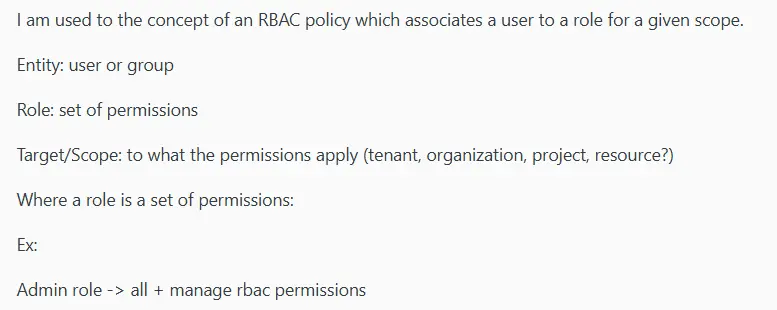
What it is: Role-based access control (RBAC) ties permissions to roles where you define what each role can access, and then assign users accordingly. Attribute-based access control (ABAC) brings contextual conditions like location, device, or time of day to decide whether that access applies in a given moment.
Most modern approaches combine both to create flexible, granular access policies. If you’re unfamiliar with the basics, one Reddit user offered a useful breakdown of how RBAC typically works:
Why it matters: Vendors often need different levels of access depending on what they’re doing and when. Static, one-size-fits-all permissions either grant too much access or create friction, which is why context-aware models let you match access to their actual need.
How to apply it:
- Define roles for common vendor types (e.g., IT support, auditor, and consultant) and assign baseline permissions to each
- Set up attribute-based rules that adjust access based on context, like blocking access from unfamiliar locations or outside business hours
- Use both models together so that the role determines what a vendor can access, and attributes determine under what conditions
- Review and update roles regularly as vendor engagements change scope or responsibilities change
- Avoid time-consuming role sprawl by keeping the number of roles manageable and well-documented
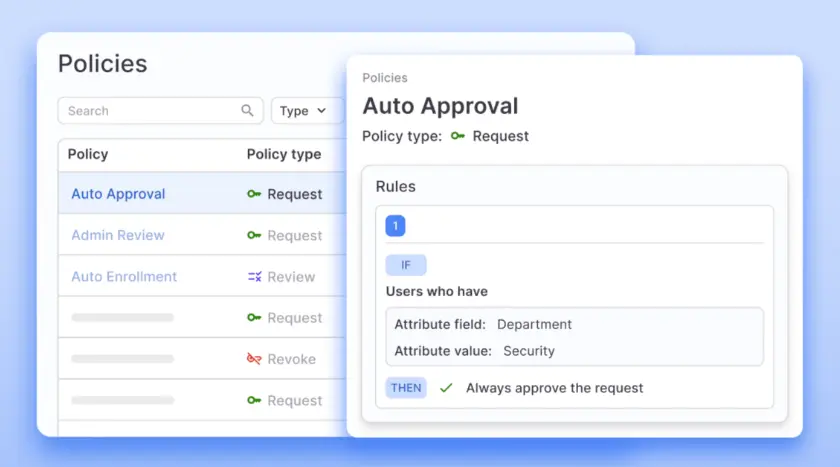
PRO TIP: With ConductorOne, you can build flexible policies that automatically expire access, revoke unused permissions, and flag changed justifications. Vendor access stays right-sized without constant oversight.
Identity federation
What it is: Identity federation connects your identity system with your vendors’ systems, so their users can authenticate with credentials they already have. Instead of issuing new usernames and passwords, you trust their identity provider to verify who they are.
Why it matters: Creating local accounts for every vendor means more credentials to manage, more password resets, and more accounts that linger after engagements end. Federation avoids that by letting vendors bring their own identity while you control the access.
How to apply it:
- Connect with vendors’ identity providers through standards like SAML or OIDC so their users authenticate through their own systems
- Maintain control on your side by defining what federated identities can access and under what conditions
- Avoid the overhead of managing local credentials for users who already have corporate identities elsewhere
- Simplify offboarding since access depends on the vendor’s identity (e.g., when they remove a user on their end, access to your systems goes with it)
- Set up federation agreements only with vendors whose identity practices meet your security rules
Vendor privileged access management (VPAM)
What it is: VPAM is a subset of privileged access management focused specifically on external users who need elevated access to your systems. It applies the same controls you’d use for internal admins (such as session monitoring, credential vaulting, just-in-time access) to vendors with high-risk permissions.
Why it matters: Some vendors need more than basic access. They need admin rights, database credentials, or access to sensitive infrastructure. But without proper controls, those privileged accounts become high-value targets that sit outside your normal oversight.
The uncomfortable truth is that many vendors don’t treat security with the same rigor you do. One user shared a common experience:

How to apply it:
- Use credential vaulting so vendors never directly hold or see the passwords for privileged accounts
- Provision elevated access only when it’s needed and revoke it automatically when the task or session ends
- Record and monitor privileged sessions, so you have a full audit trail of what vendors do with sensitive information access
- Set up stronger authentication rules for privileged access, including approval gates where appropriate
- Reassess privileged vendor access frequently and default to revocation when the ongoing need isn’t clear
Managing the third-party identity lifecycle
A strong TPAM strategy needs to be operationalized across the full lifecycle of each vendor relationship. People join, roles change, and engagements end, so your access strategy needs to keep pace.
Here’s how to approach each stage of the lifecycle:
1. Onboarding (the joiner)
The objective: The goal of onboarding is to get vendors working without granting more access than they need. That means balancing speed with control, and setting them up quickly while being deliberate about what they can reach.
Common pitfalls: Rushed onboarding often leads to over-provisioned access, undocumented permissions, or skipped security posture checks. These shortcuts create risk and cyber threats that compound over time, especially when no one revisits the original access decisions.
And if you’ve ever felt like vendor onboarding is chaotic in your org, you’re not alone. Questions like this are especially common on Reddit:

How to approach it:
- Confirm the vendor’s identity and their specific role in the engagement before provisioning anything
- Scope access to the actual work being done rather than defaulting to broad or template-based permissions
- Apply least-privilege principles so vendors only get access to the systems and data they truly need
- Keep a record of what was granted, the justification, and who signed off on it
2. Operational management (the mover)
The objective: Once a vendor is onboarded, access needs don’t stay fixed. Operational management makes sure that permissions keep pace with changes in scope, role, or project needs throughout the engagement.
Common pitfalls: Access creep is the main risk here. Vendors pick up new access as their work expands, but old permissions stick around. Over time, you end up with accounts that have far more reach than the current engagement justifies.
How to approach it:
- Use any change in engagement scope as an opportunity to right-size access, not just expand it
- Remove access that’s no longer relevant instead of letting old permissions persist alongside new ones
- Keep documentation current so there’s always a clear record of what each vendor can access and why
- Assign clear ownership for vendor access decisions so changes don’t fall through the cracks
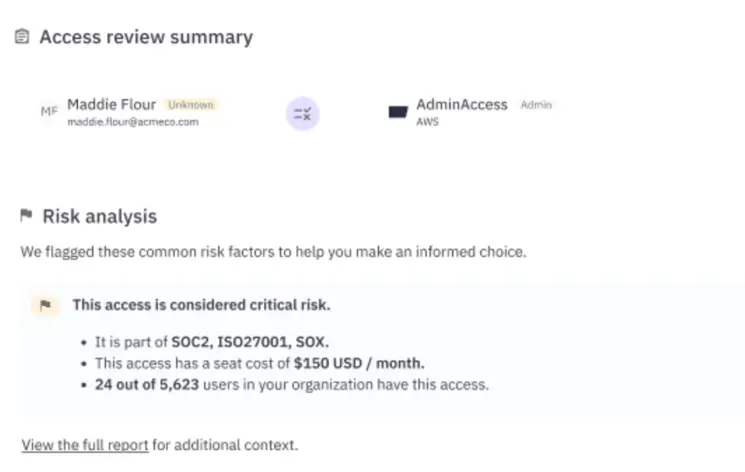
PRO TIP: ConductorOne automatically flags unused permissions and access anomalies, so you can spot access creep before it becomes a problem. When a vendor’s role changes, you can right-size their access in a few clicks instead of waiting for the next scheduled review.
3. Offboarding (the leaver)
The objective: This stage is about clean exits. Vendors who are no longer working with you shouldn’t have any path into your environment, and offboarding is where you make sure that’s the case.
Common pitfalls: Once a project wraps, offboarding tends to slip down the priority list. But every account that stays active after an engagement ends is an unmonitored entry point waiting to be discovered.
How to approach it:
- Cover all access types, including VPN credentials, SaaS accounts, API keys, and shared credentials.
- Revoke access as soon as the engagement ends rather than waiting for a scheduled clean-up cycle
- Validate that revocation is complete – dormant accounts have a way of surviving clean-up requests
- Coordinate with the vendor to make sure that their side is cleaned up too, especially in federated setups
- Log what was revoked and when, so you have a clear record if questions come up later
Why JIT is the future of third-party access management
Traditional third-party access tends to work in one direction. Vendors get credentials when an engagement starts, but those credentials rarely get removed on schedule. They sit there, active and unmonitored, until someone remembers to revoke them. And most of the time, no one does.
Just-in-time access takes the opposite approach. Vendors request access when they need it, get it for a limited window, and lose it automatically when the task is done. There’s no standing access to manage or forget about.
Here’s how the two models compare:
Traditional access | Just-in-time access |
Always on until manually revoked | Granted on demand, revoked automatically |
Permissions accumulate over time | Access exists only during active use |
Dormant accounts create risk | No standing accounts to exploit |
Manual offboarding required | Access expires without intervention |
Despite the benefits, most organizations are still running on always-on access. Research shows that only 1% of companies have fully adopted JIT, while 91% say at least half their privileged access is persistent.
And given that 74% of breaches involve credential misuse or other human factors, that’s a lot of unnecessary exposure.
Why JIT is critical for vendors
Vendor access tends to be broader than it looks. What starts as a limited engagement often involves admin credentials, database access, or production system entry.
Without tight controls, those accounts become easy targets for attackers and are easy to forget about internally. Consider the following:
- The average organization has a massive vendor footprint: According to Secureframe, organizations have 182 vendors connecting to their systems each week. Managing standing access across that many relationships is impractical without automation.
- Credential-based breaches take the longest to detect: IBM data shows that breaches involving compromised credentials take an average of 283 days to find and contain. JIT reduces that window by making credentials temporary.
- Privileged credential abuse remains a top attack vector: 74% of breaches involve access to privileged accounts, according to Centrify. Vendors with standing privileged access represent exactly the kind of target attackers look for.
- Unintentional over-exposure is common: Wiz reports that 82% of companies accidentally give third parties access to their entire cloud environment. JIT prevents this by tying access to specific tasks and timeframes.
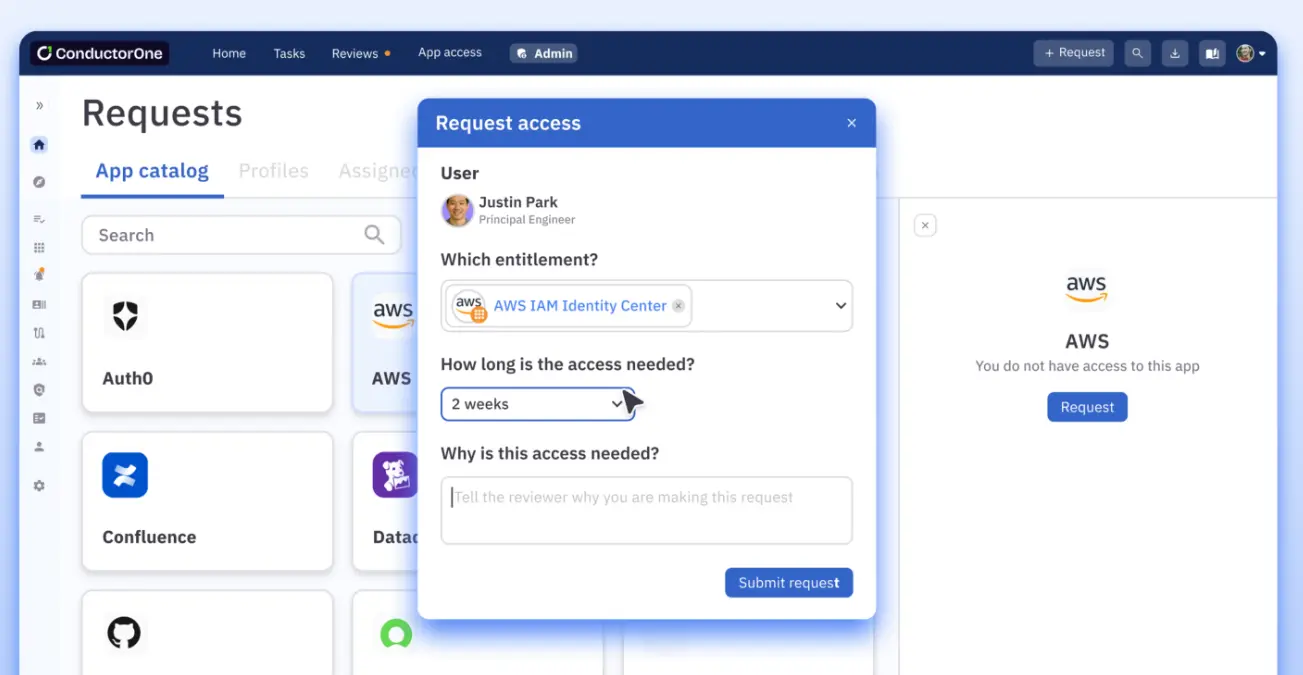
PRO TIP: ConductorOne makes just-in-time access practical at scale. Vendors request what they need through Slack, web, or CLI, while approvals route to the right person automatically, and access revokes itself when the job is done.
Challenges of third-party access management
Third-party access management isn’t complicated conceptually. The difficulty is doing it well across dozens or hundreds of vendor relationships, each with different needs and timelines.
Most organizations know what good looks like, but executing it at scale isn’t easy. Here are a few challenges that come up repeatedly:
- Most companies don’t have a complete picture of their vendors: Only 54% of organizations maintain a comprehensive inventory of all third parties accessing their network. You can’t manage access for vendors you haven’t accounted for.
- Managing vendor access is a time sink: Security teams in some industries spend an average of 47 hours per week analyzing third-party access risks, with nearly a third investing over 100 hours. That’s unsustainable for most teams without automation.
- Least-privilege principles are rarely applied consistently: 49% of organizations say they provide third parties with only the access they need and nothing more. The rest are over-provisioning by default.
- Stolen credentials remain the top attack vector: 35.5% of third-party breaches involve compromised vendor credentials. If those credentials have standing access, hackers have time to use them.
- Third-party access is widely seen as the weakest link: 48% of organizations now report third-party remote access as the most vulnerable part of their attack surface. Despite that awareness, most still lack the tools and processes to tackle it properly.
Best practices checklist
Getting third-party access management right means putting the right policies, processes, and controls in place. Here’s what that looks like in practice:
1. Centralize your identity inventory
A centralized identity inventory gives you a complete picture of every third party connected to your environment and serves as the starting point for any serious TPAM effort.
At a minimum, your inventory should track:
- Who the vendor is and what organization they represent
- What systems and data they can access
- When access was granted and when it expires
- Who internally owns the vendor relationship
- What level of access they have (standard vs. privileged)
This is the foundation everything else builds on. Access reviews, offboarding, compliance reporting – none of it works smoothly if your inventory is incomplete or out of date.
2. Enforce least privilege access by default
Least privilege means that third-party users should only have access to what’s necessary for their work. This user on Reddit gave a great explanation on the topic:
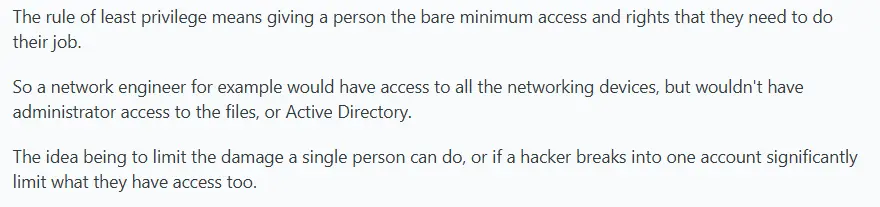
And since vendor engagements are usually scoped to specific tasks, there’s rarely a reason for broad or permanent access.
Yet, many organizations default to over-provisioning because it’s faster than figuring out exactly what’s needed.
To apply this consistently across third-party vendor relationships:
- Start with minimal access and expand only when there’s a clear, documented reason
- Match permissions to the specific engagement scope, not a generic vendor template
- Ask for written justification and approval for any elevated or privileged access
- Review access on a regular schedule to catch permissions that no longer apply
- Revoke unused access proactively, even before the engagement formally ends
It’s true that making least privilege the default takes more effort upfront, but it significantly reduces your exposure over time.
3. Mandate strong authentication (MFA & federation)
Any vendor accessing your systems should be required to use multi-factor authentication (MFA). You have no control over how they manage passwords on their end, and you can’t assume they follow the same security standards you do. A second authentication factor reduces your dependence on their security practices.
Federation builds on this by connecting to the vendor’s own identity provider. You’re not issuing or managing their credentials, which means fewer accounts to track. And when the service provider offboards someone on their end, that person loses access to your environment automatically.
To put both into practice:
- Require MFA for all third-party accounts with no exceptions for convenience
- Use federation (SAML, OIDC) for vendors with mature identity programs
- Remove shared credentials and require unique logins for every user
- Set authentication policies centrally so standards are applied consistently
Strong authentication won’t solve every unauthorized access problem or catch every suspicious activity, but it closes one of the most common entry points that attackers exploit.
4. Automate the offboarding
Access revocation shouldn’t depend on someone remembering to file a request. Offboarding is a predictable, repeatable process, which makes it a natural candidate for automation.
These are the steps that should happen automatically when a vendor engagement ends:
- Revoke access across all systems and apps that the vendor could reach
- Disable or delete accounts so credentials can’t be reused later
- Notify internal owners that offboarding is complete
- Log everything for audit and compliance purposes
- Put a pin on any anomalies, like access attempts after revocation
Set clear triggers for these actions, such as contract end dates, project completion, or a period of inactivity. The point is to make revocation automatic so nothing depends on manual follow-up.
5. Log everything for audit readiness
If you can’t show who had access, what they did, and when it was revoked, you’re not ready for a data protection audit. But with proper logging in place, that history is already documented and ready to pull.
For every third-party account, make sure you’re logging:
- Access requests and who approved them
- Provisioning and deprovisioning timestamps
- Session activity, including critical systems and data accessed
- Access permission changes made during the engagement
- Failed VPN access attempts and policy violations
Keep logs centralized, set retention policies that meet your regulatory obligations, and make sure you can search them quickly. The value of logging depends on how fast you can retrieve what you need.
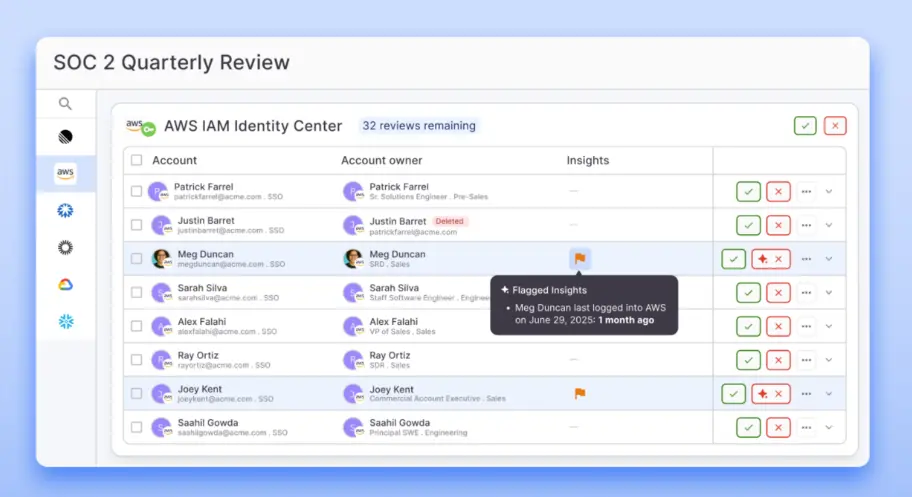
PRO TIP: ConductorOne captures a complete audit trail for every vendor access decision, including requests, approvals, changes, and revocations. You can create and streamline compliance reports with one click, so you’re not scrambling when audit season hits.
Reduce third-party risks with ConductorOne
Third-party access is manageable when vendor relationships are few and far between. But most organizations don’t stay in that position for long. As your vendor footprint expands, so does the attack surface, and the manual workarounds that once felt good enough start to leave gaps that are hard to track and easy to exploit.
That’s where ConductorOne comes in. It’s an AI-native identity governance platform that centralizes access management for every identity type, from full-time employees to external vendors to non-human identities like service accounts.
For organizations that work with external partners, ConductorOne makes it possible to apply least privilege, automate the access lifecycle, and remove the standing credentials that put your environment at risk.
Here’s what the platform brings to third-party access management:
- Just-in-time access: ConductorOne lets you replace standing vendor privileges with temporary, task-scoped access that revokes automatically when the work is done.
- Full lifecycle automation: The platform automates every stage of the vendor access lifecycle, from provisioning on day one to immediate revocation when an engagement ends. You can trigger workflows based on contract dates, project completion, or periods of inactivity.
- A unified view of all access: ConductorOne’s Unified Identity Graph pulls access and permissions data from across your environment into a single pane of glass. You can see exactly what each vendor can reach, who approved it, and when it expires.
- Self-service requests: Vendors can request access through Slack, a web portal, or the command line. Approval workflows route the request to the right person automatically.
- 300+ out-of-the-box connectors: ConductorOne integrates with cloud platforms, on-prem systems, SaaS apps, and even legacy or homegrown tools. That flexibility is especially important when vendor engagements span multiple environments.
- Built-in compliance support: The platform supports the most relevant frameworks like SOC 2, ISO 27001, and HIPAA. Access reviews run on schedule, evidence collects automatically, and audit reports are ready with a single click.
- AI-powered access decisions: ConductorOne’s Copilot gives approvers contextual, risk-based recommendations so they can make faster, more informed decisions on vendor access requests.
If third-party access is a blind spot in your security program, ConductorOne can help you close the gap, without bringing any extra friction for your vendors or your team.
Book a demo to see how it works.
FAQs
Why are external vendors a frequent target for cyberattacks?
Vendors often have access to sensitive data and systems, but operate outside your direct security controls. Attackers know this, and they know that compromising a single vendor can open doors into multiple customer environments.
It’s a lower-risk, higher-reward entry point compared to going after a well-defended target head-on.
How can we ensure secure third-party access without blocking work?
You can start by replacing standing access with just-in-time provisioning – vendors request access for specific tasks, get it quickly through automated workflows, and lose it when the work is done.
Pair that with self-service portals and Slack-based approvals, and you remove friction without sacrificing any control.
What are the consequences of failing to secure third-party activities?
Unsecured vendor access can lead to data breaches, compliance violations, reputational damage, and major financial losses.
Third-party incidents also tend to take longer to detect and manage, which gives attackers more time to move laterally and do damage.
How often should we conduct vendor access reviews?
Quarterly is the baseline for most organizations, but you shouldn’t treat it as a ceiling. Vendors with elevated privileges or access to key systems warrant more frequent reviews.
You should also trigger a review any time a vendor’s role changes or a project wraps up. Waiting for the next scheduled cycle leaves too much room for access to linger.

