


For years, identity governance and administration (IGA) was viewed primarily as a back-office compliance function—a necessary hurdle to satisfy auditors. Today, the landscape has shifted. With the explosion of cloud-based apps, remote work, and non-human identities and AI agents, IGA has become the cornerstone of a modern cybersecurity strategy.
Implementing an IGA solution is no longer just about passing audits; it is about reducing the attack surface, enabling safe use of AI agents, and ensuring operational efficiency. However, many IGA initiatives fail due to poor planning, dirty data, or scope creep.
To help you navigate this complexity, we have compiled 13 IGA best practices to help you build a program that improves your security posture while streamlining operations.
1. Secure executive sponsorship
IGA touches every part of the organization, from IT and HR to Legal and Procurement. Without high-level backing, cross-functional friction is inevitable.
It is critical to align executive stakeholders—not just from security teams, but from senior management and compliance—early in the process. Their sponsorship ensures accountability and helps drive the necessary cultural changes required to enforce new user access policies.
2. Clean data proactively
Garbage in, garbage out is a major risk in identity governance and administration. If your source data (e.g., in HR directories) is messy, your governance automation will fail. Before ingesting data into your IGA systems, proactively clean and standardize identity data.
Ensure that user identities have consistent attributes—like department, manager, and location—so that downstream automation rules trigger correctly.
3. Automate lifecycle management
Manual processes are the enemy of security and speed. You should automate the entire identity lifecycle management process—from provisioning to role changes and de-provisioning.
This ensures that access is granted instantly when a user joins (onboarding) and, more importantly, revoked immediately when they leave (offboarding).
Real-time automation prevents the accumulation of zombie accounts and reduces the risk of unauthorized access by former employees.
4. Adopt a phased approach
A common failure mode in identity governance and administration is the “big bang” deployment—trying to onboard every application and user at once. This complexity often stalls the project.
Instead, prioritize a phased rollout. Start with your crown jewels—the authoritative sources (like HR) and critical applications that host sensitive data. Once these core systems are secure and the workflows are stable, expand to tier-2 applications and more complex edge cases.
5. Standardize over customization
Many organizations fall into the trap of thinking, “We are different from everyone else,” and heavily customize their IGA solution to match legacy manual processes. This is a mistake.
Custom code creates technical debt. It makes upgrades difficult, breaks integrations, and requires expensive specialized maintenance. Whenever possible, adapt your internal processes to fit the standard configuration of modern IGA tools. Standardization ensures scalability and allows you to leverage new features immediately without breaking your custom implementation.
6. Implement role-based access control (RBAC)
Moving from ad-hoc access to role-based access control (RBAC) is a foundational step for maturity. Assigning access rights based on standardized job functions rather than individual requests streamlines onboarding and reduces human error.
By mapping permissions to roles (e.g., Marketing Manager or DevOps Engineer), you ensure that new hires receive the correct appropriate access on day one, and that access is consistent across the team.
7. …but avoid role explosion
While RBAC is powerful, it has a breaking point. A common pitfall is creating a highly specific role for every minor exception, leading to role explosion where you have more roles than employees.
To avoid this, focus on birthright access (baseline access everyone needs) and broad job functions. Do not try to model every edge case with a static role. Keep your role definitions coarse-grained to cover 80% of access needs, and handle the remaining 20% of high-risk or specific entitlements through Just-in-Time (JIT) requests or exception workflows.
8. Adopt zero trust and enforce least privilege
Effective security requires a shift from “trust but verify” to “never trust, always verify.”
Zero trust dictates that no user or device is trusted by default, regardless of their network location.
To make this practical, you must enforce the principle of least privilege. Ensure that users only hold the specific access rights necessary to perform their current job functions. By strictly limiting the scope of access, you minimize the blast radius if a user account is compromised, significantly reducing the impact of potential cyber threats.
Case study → How Instacart uses AI to achieve zero standing privileges
- Instacart moved 100% of privileged access to automated, policy-based Just-in-Time (JIT) workflows, significantly reducing the blast radius of potential breaches.
- The team developed Gadjit, an LLM-powered security bot that analyzes identity data to automate sensitive access approvals with near 100% accuracy.
- By managing access policies via Terraform, Instacart builds oversight directly into the auto-approval process, allowing for rapid iteration and audit-friendly configurations.
“This has been a paradigm shift in efficiency at Instacart. Now getting access is easier and more secure, and managers aren’t spending a bunch of time reviewing access on a daily or quarterly basis.” — Matthew Sullivan, Infrastructure Security Team Leader, Instacart
Related reading → 7 Principles for Least Privilege Access Implementation
9. Enable Just-in-time (JIT) access
Standing privileges—where a user has permanent administrative access—are a liability. Even with multi-factor authentication (MFA), a compromised admin account is a golden ticket for attackers.
To reduce this risk, implement Just-in-time (JIT) access. Instead of permanent entitlements, grant temporary, time-bound access to high-risk systems only when needed.
For example, an engineer requests access to a production server for 2 hours to fix a bug. Once the window closes, the access is automatically revoked, ensuring no backdoor remains open.
10. Conduct regular access reviews
Access certification is often treated as a rubber stamp compliance chore, but it is your safety net for detecting orphan accounts and access creep.
Move beyond the spreadsheet. Regular access reviews should be automated and context-rich. Provide reviewers with data—such as Last Login Date—so they can make informed decisions. If a user hasn’t used a permission in 90 days, the reviewer should be prompted to revoke it. This keeps your security posture tight and ensures compliance with GDPR and NIST standards.
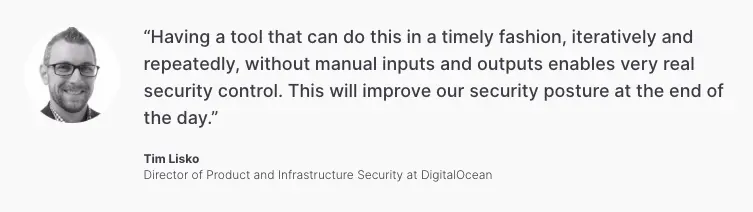
Case study → How DigitalOcean reduced risk by automating user access reviews
- DigitalOcean completed 1,200 access reviews across seven departments with 85% less effort compared to their previous spreadsheet-based methods.
- The security team achieved a 100% on-time completion rate for review campaigns by offering an intuitive, user-friendly experience directly within Slack.
- Instead of compiling hundreds of Jira tickets for auditors, the team now generates a single, automated report for SOC2 and SOX controls, drastically improving accuracy.
11. Monitor with real-time risk analytics
Static governance is no longer enough. Shift from reactive audits to proactive monitoring by using real-time risk analytics.
Your IGA tools should continuously monitor for policy violations, such as segregation of duties (SoD) conflicts (e.g., a user who can both create and pay a vendor).
By detecting unusual behavior or toxic combinations of permissions as they happen, you can intervene before a data breach occurs.
12. Unify human and machine governance
The number of machine identities (bots, APIs, service accounts) now far exceeds human users in most organizations, yet they are often managed in silos. This creates massive security gaps.
Avoid managing non-human identities in spreadsheets or separate tools. Treat identity as a continuum. Your IGA solution should provide a single pane of glass for all identities—human, machine, and AI agents.
Apply the same rigor to bots as you do to employees: define owners, enforce lifecycle policies, and rotate credentials (like API keys) regularly to prevent unauthorized access.
Learn more → Identity Lifecycle Management for Non-Human Identities
13. Prepare for AI autonomy
As organizations adopt AI agentsthat can perform tasks on behalf of employees, the line between human and machine identity is blurring, such as having an AI system negotiate a contract or book travel using an employee’s credentials.
You must begin developing governance models now that account for this autonomy. Ensure your access policies can distinguish when an AI agent is acting on behalf of a human versus the human themselves.
Apply specific access control constraints to these agents to prevent them from exceeding their intended scope or hallucinating their way into data breaches.
Related reading → How ConductorOne Built Guardrails Into Our AI Agents
Automate your IGA strategy with ConductorOne
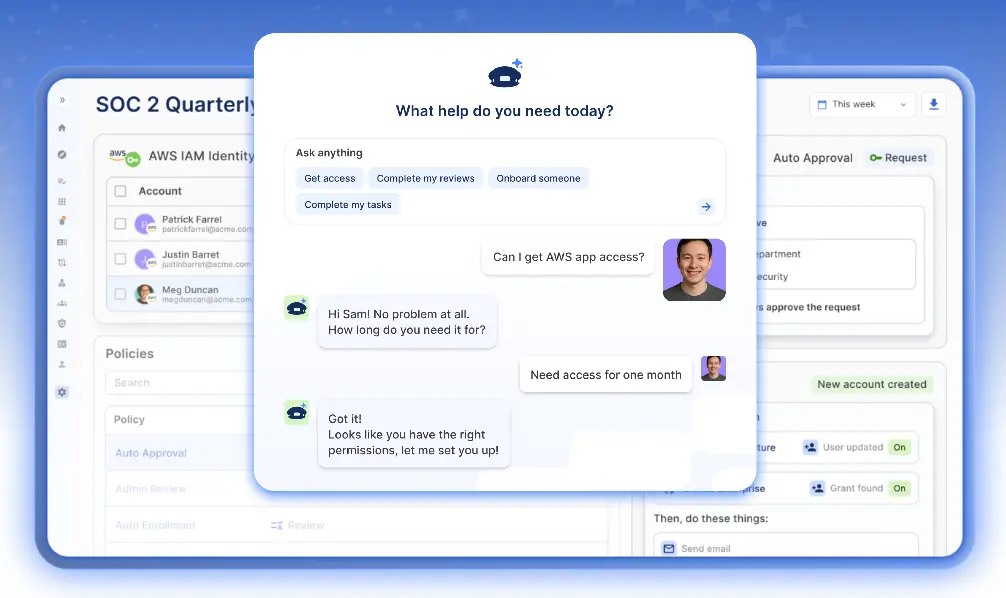
Implementing these best practices manually or with clunky legacy tools is a recipe for burnout. Identity is evolving too fast for siloed data and spreadsheet-based processes.
ConductorOne allows you to unleash the power of autonomous identity governance. It is an AI-native platform designed to secure every identity—human, non-human, and AI—continuously and at scale.
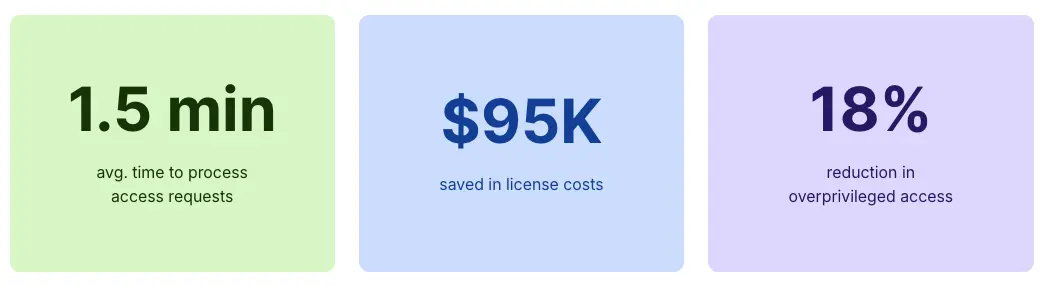
Here is how ConductorOne turns these best practices into standard practice:
- Frictionless least privilege: Make it fast and easy for employees to get exactly the access they need to be productive—and no more. Replace standing privileges with Just-in-time (JIT) workflows that auto-expire.
- Continuous compliance: Make audit readiness the default. Automate lifecycle management, SoD tracking, and intelligent access reviews so your team can focus on exceptions rather than routine busywork.
- Always-on risk remediation: Proactively find and fix orphaned accounts, unrotated credentials, and access anomalies automatically, before they become security risks.
- Unified identity data management: Establish one source of truth. Manage multiple directories and user types, and automatically sync changes to downstream systems to ensure your data is always clean and actionable.

Stop managing identity in the dark. Get a demo to see how ConductorOne can secure your environment today.
IGA Best Practices FAQs
How does identity governance administration (IGA) differ from standard identity and access management (IAM)?
- Identity and access management (IAM) primarily focuses on authentication and real-time access management (letting users in).
- Identity governance administration (IGA) complements IAM by governing the lifecycle and policy, ensuring that access remains compliant and secure over time.
How does IGA streamline compliance audits?
IGA automates access requests and certifications, creating the immutable audit trails necessary to meet strict compliance requirements. This replaces manual ticket tracking with a verified history of every approval and revocation.
Can modern IGA tools manage legacy systems?
Yes. A robust IGA strategy must cover your entire ecosystem, from modern cloud SaaS apps to legacy on-premises infrastructure. This ensures consistent data security regardless of where the application resides.
How does role management impact risk?
Effective role management assigns permissions based on standardized job functions rather than ad-hoc user requests. This supports proactive risk management by ensuring users only hold the specific entitlements necessary for their job, reducing the attack surface.


